France e-invoicing solution: Implementation Approach for Customers and Partners
Overview
This document presents a high-level overview of the proposed solution and implementation approach required by customers and partners to enable e-invoicing for France within Concur Expense.
The document provides the technical approach for external partners to implement PULL based approach.
Solution Approach (Pull Model)
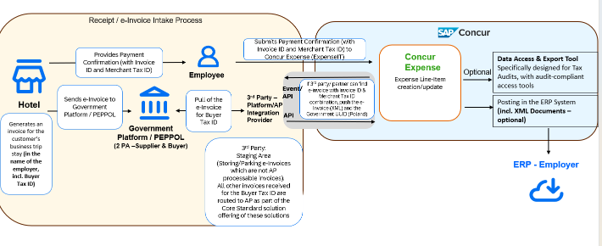
Solution from Concur Expense
The following enhancements outline the proposed system behaviour to support France e-invoicing within Concur Expense.
1. Introduction of Standard Fields
Concur Expense will introduce standard fields to capture:
- Merchant Tax ID
- Invoice ID
Prior to September 2026, the Invoice ID and Merchant Tax ID fields were not added automatically to the expense entry form. From September 2026, these fields are added automatically when France is selected as the digital compliance country.
2. Field Availability and Data Entry
These fields will be available at the expense entry level.
- Merchant Tax ID and Invoice ID will be editable fields, allowing employees to manually input the relevant values.
Note: Additional configuration is required within Concur Expense to enable the Invoice ID and Merchant Tax ID on the entry forms. See Concur Expense Configuration below, from September 2026.
3. Trigger for External Partner Integration
When both the Merchant Tax ID and Invoice ID are provided by the employee, SAP Concur platform will trigger an external event to notify subscribed partners.
This event is to indicate partner that employee has triggered an expense creation and relevant e-invoice is to be retrieved.
The event-based mechanism is to provide near real-time experience to the employee, the expense report remains in processing status for the time partner responds to the event by calling the API with e-invoice document.
4. Inbound Data from Partner
SAP Concur platform will provide an API to accept the e-invoice in supported formats UBL, CII and Factur-X from the connected partner system.
The API would also accept other tokens like amount, date as read from XML invoice by the partner.
5. Expense and Invoice Linking
The retrieved e-invoice document will be automatically linked to the corresponding expense item created by the employee.
Partner Implementation
1. Event Subscription
The partner must subscribe to the external event and provide a designated endpoint to receive event notifications from Concur Expense.
2. Invoice Retrieval and Submission
Upon receiving the event, the partner is responsible for identifying the corresponding e-invoice using the Merchant Tax ID and Invoice ID provided in the event payload.
The partner will then transmit the e-invoice to Concur Expense through the provided API.
Additionally, the partner must extract the necessary data elements (tokens) from the XML invoice and include these values in the API request to populate the relevant expense item.
If the partner could not find the corresponding e-invoice, it should provide the relevant error message to Concur Expense. The expectation would be to receive response from partners in real real-time on raising the events.
Technical Steps for Partner Integration
1. Generate AppID (Client ID)
Clients who have Client Web Services can generate Client IDs (App IDs) and Client Secrets as described in the document:
| [SAP Concur Developer Center | OAuth 2.0 Application Management Tool](https://developer.concur.com/api-reference/authentication/apidoc.html) |
Specify the following scopes while creating new app:
Required Scopes:
events.topic.read,receipts.read,receipts.write
This would provide ClientID and clientSecret.
This activity can be performed by SAP Concur platform customer admin and does not require action from integration partner.
2. Authentication: Generate Company Request Token
A Company Request Token is required to request an Access/Refresh Token (JSON web token or JWT) for connecting to APIs in the SAP Concur platform.
| [SAP Concur Developer Center | Company Request Token Self-Service Tool](https://developer.concur.com/api-reference/authentication/company-auth.html) |
This activity can be performed by SAP Concur platform customer admin and does not require action from integration partner.
3. Event Subscription
This activity needs to be performed by integration partner.
Partner needs to subscribe to the event with an endpoint to receive event notification. Steps to subscribe to events are detailed here: SAP Concur Developer Center | Event Subscription Service v4
The details of the specific event are mentioned here: SAP Concur Developer Center | Document Tax Compliance Event
Steps to be performed by integration partner for event subscription:
a. Obtain an access token using the client_credentials grant
POST /oauth2/v0/token HTTP/1.1
Host: us2.api.concursolutions.com
Content-Type: application/x-www-form-urlencoded

client_id={your-app-client-id}
&client_secret={your-app-client-secret}
&grant_type=client_credentials
This will generate an access token.
b. Create a subscription to topic with a web hook app endpoint
PUT /v4/subscriptions/webhook HTTP/1.1
Host: www-us2.api.concursolutions.com
Authorization: Bearer {access_token}
Content-Type: application/json

{
  "id": "<unqiue subscription id for customer>",
  "filter": "FR.compliance",
  "topic": "public.concur.document.tax.compliance",
  "webHookConfig": {
    "endpoint": "<web hook endpoint for event processing>"
  }
}
c. Call SAP Concur Auth API
POST /oauth2/v0/token HTTP/1.1
Content-Type: application/x-www-form-urlencoded
Host: us.api.concursolutions.com

client_id=<your-client_id>
&client_secret=your-client_secret
&grant_type=password
&username=<companyId>
&password=<company request token>
&credtype=authtoken
Partner would be able to receive events after performing these steps.
Example event for FR
{
  "correlationId": "franceteststandard",
  "eventType": "FR.compliance",
  "topic": "public.concur.document.tax.compliance",
  "subtopic": null,
  "timeStamp": "2026-01-06T17:16:22.235Z",
  "data": null,
  "facts": {
    "companyId": "8e093375-2319-435e-95d1-9482d17b3d65",
    "isDisplayVersionRequired": false,
    "isComplianceDocRequired": true,
    "taxId": "dcgmerD233",
    "complianceCountryCode": "FR",
    "documentId": "d91c624a-d152-45e3-8331-5b611e97c1eb",
    "invoiceId": "dcginv233",
    "href": "https://us2.api.concursolutions.com/document-compliance-gateway/v4/taxdocuments/d91c624a-d152-45e3-8331-5b611e97c1eb"
  },
  "id": "63f5b366-63d5-4343-8f15-ed7246da9b67"
}
For France, the complianceCountryCode would be FR and the event is enhanced to include Merchant Tax ID (taxId) and Invoice ID (invoiceId).
4. Implement Document Compliance Gateway API to accept XML document and token data
| API Details: [SAP Concur Developer Center | Document Compliance Gateway v4](https://developer.concur.com/api-reference/document-compliance-gateway/v4.document-compliance-gateway.html) |
The API can accept XML document in addition to the tokenized data. The e-invoice retrieved from KSeF portal should be sent as an XML document.
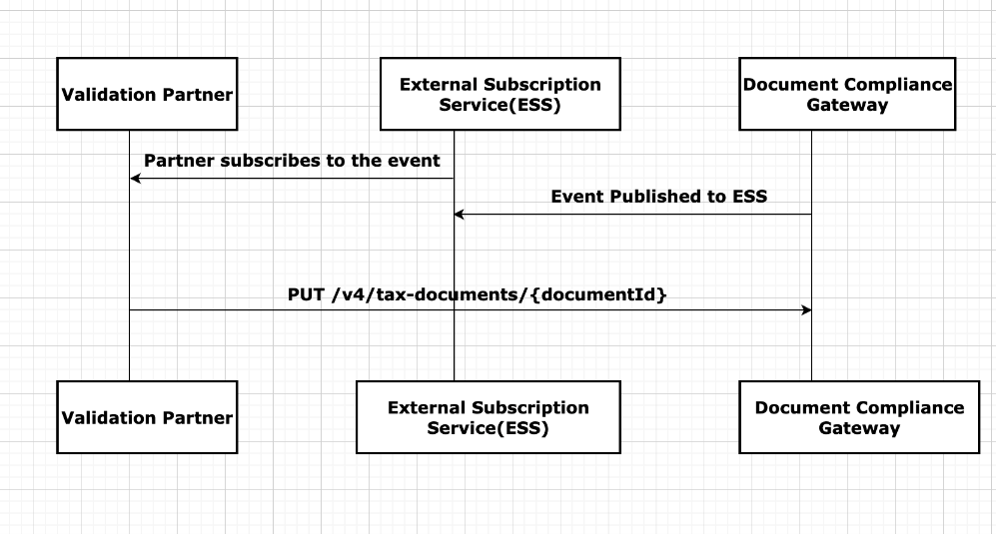
Example
PUT API CALL
Scopes: receipts.write
Request:
PUT https://{region}.api.concursolutions.com/document-compliance-gateway/v4/tax-documents/{documentId}
Parameters
| Name | Type | Format | Description |
|---|---|---|---|
| documentId | string | Unique id assigned to a document. |
Headers
- Authorization is provided through an App for Business and the company JWT.
concur-correlationidis used to track the workflow for every step.
Payload
-
digitalTaxDocument— A digitalTaxDocument file in JSON format that is required. displayedVersion— A multipart compliant document in human-readable PDF format.- If the end user only uploads the XML file, the partner will receive the event with
isDisplayVersionRequired = true.- In such scenarios, if the xml file is valid and processed, the partner needs to convert the XML file into PDF format and upload it in the
displayedVersionfield mandatorily. - If the XML file is invalid or has failed, uploading the
displayedVersionis optional.
- In such scenarios, if the xml file is valid and processed, the partner needs to convert the XML file into PDF format and upload it in the
- If the end user only uploads the XML file, the partner will receive the event with
complianceDocument— A multipart compliant e-document containing the structured e-invoice data.- The partner will receive the event with
isComplianceDocRequired = true.- In such scenarios, if the partner is able to fetch the compliance document from the official authorities (status: processed), it must be provided in the
complianceDocumentfield as a multipart attachment. - If the partner is not able to fetch the compliance document from the official authorities (status: failed), uploading the
complianceDocumentis optional.
- In such scenarios, if the partner is able to fetch the compliance document from the official authorities (status: processed), it must be provided in the
- The partner will receive the event with
Once you have the token, use the following curl command to post invoice details:
curl --location --request PUT 'https://integration.api.concursolutions.com/document-compliance-gateway/v4/tax-documents/{documentId}' \
  -H 'Authorization: Bearer <JWT token>' \
  -H "concur-correlationid: {LogicalId}" \
  --form "digitalTaxDocument"=@"DigitalTaxToken.json" \
  --form complianceDocument=@"FR-CompliantDoc.xml"
Response Example
Request
PUT https://us2.api.concursolutions.com/document-compliance-gateway/v4/tax-documents/d91c624a-d152-45e3-8331-5b611e97c1eb
Authorization: Bearer <JWT Token>
concur-correlationid: "polandteststandard"
digitalTaxDocument:
{
  "Status": "processed",
  "Description": "FR Validation",
  "DocumentData": {
    "FormatVersion": "4.0",
    "Code": "AQ",
    "Number": "InvoiceStandard",
    "IssueDateTime": "2022-10-19T07:24:53",
    "GrossAmount": 517.24,
    "Discount": null,
    "Currency": "EUR",
    "NetAmount": 600,
    "PaymentMethod": "PUE",
    "DocumentPostalCode": "12345",
    "Vendor": {
      "CertificateNumber": "00001000000508021176",
      "TaxNumber": "MerchantTaxStandard",
      "Name": "France Vendor Name"
    },
    "Buyer": {
      "TaxNumber": "Buyer1234",
      "Name": "SAP France Buyer",
      "PostalCode": "12345"
    },
    "TotalSalesTax": 82.76,
    "TotalWithholdingTax": null,
    "UUID": "123456789-ABCD9876-CA63CA-F92EEF-RC",
    "PaymentType": "Cash",
    "LineItems": [
      {
        "ProductCode": "90101500",
        "Quantity": 1,
        "UnitOfMeasure": "E48",
        "Description": "Water Mineral",
        "UnitPrice": 60.34,
        "Amount": 60.34,
        "Discount": null
      },
      {
        "ProductCode": "90101500",
        "Quantity": 1,
        "UnitOfMeasure": "E48",
        "Description": "Product Description",
        "UnitPrice": 189.66,
        "Amount": 189.66,
        "Discount": null
      }
    ]
  }
}
Response
HTTP/1.1 200 OK
Content-Type: application/json

{
  "DocumentId": "d91c624a-d152-45e3-8331-5b611e97c1eb",
  "Description": "Tokens have been received."
}
Schema
DigitalTaxDocument Schema
| Name | Type | Format | Description |
|---|---|---|---|
| status | string | "enum": ["processed", "failed"] |
Required — Status of the compliance document. |
| documentData | object | DocumentData Schema | Required — Document details and Tax Token info (Can be null for failed status). |
| code | string | optional | Response code provided by partner. |
| description | string | optional | Comment/description provided by partner. |
DocumentData Schema
| Name | Type | Format | Description |
|---|---|---|---|
| issueDateTime | string | YYYY-MM-DDTHH:mm:ssZ |
Required — Date and time when the document was created in the local timezone where it was issued. |
| uuid | string | - | Required — Document UUID - field present in compliance document/Government doc unique id. |
| grossAmount | number | - | Required — Sum of amounts before discounts and taxes. |
| currency | string | "enum": ["INR","MXN","USD",..] |
Required — Currency used to express amounts (According to the ISO 4217 codes). |
| exchangeRate | string | - | Required — Exchange Rate according to currency used. |
| netAmount | number | - | Required — Gross Amount – Discounts + VAT Taxes – Withholding Taxes. |
| paymentMethod | string | - | Required — Specify the code of payment method: PUE - only one payment, PPD - payment done in partial payments, PIP - Initial payment and partialities. |
| vendor | object | Vendor schema | Required — details of the vendor. |
| formatVersion | string | "enum": ["4.0",..] |
Version of the compliance document. |
| buyer | object | Buyer schema | Details of the buyer. |
| number | string | - | Number/Supplier Document Id of the receipt. |
| code | string | - | Prefix of receipt, an alphanumeric field that can refer to a physical place (POS, branch, factory, warehouse, office, etc.) or any other criteria (like business, line of product, etc.) |
| documentPostalCode | string | - | Postal code of place of receipt issue. |
| paymentType | string | "enum": ["01", "02", "03"] |
Means of payment (01 (Cash), 02 (Cheque), 03 (Bank Transfer/Digital Wallet)). |
| discount | number | - | Total amount of applicable discounts before taxes. |
| totalSalesTax | number | - | Sum of all sales tax amounts of line items. |
| totalWithholdingTax | number | - | Sum of all withhold tax amounts of line items. |
| lineItems | array | LineItem schema | Line items present in the compliance document. |
| verificationCode | string | - | Company’s certificate used to generate digital signature. |
| comments | string | - | Comment/description. |
Vendor Schema
| Name | Type | Format | Description |
|---|---|---|---|
| taxNumber | string | - | Required — Taxpayer ID of the vendor. |
| certificateNumber | string | - | Company’s certificate used to generate digital signature. |
| name | string | - | Name of receipt issuer. |
| city | string | - | City of receipt issuer. |
| state | string | - | State of receipt issuer. |
| country | string | - | Country of receipt issuer. |
| phone | string | - | Phone number of receipt issuer. |
| addressLine | string | - | AddressLine of receipt issuer. |
Buyer Schema
| Name | Type | Format | Description |
|---|---|---|---|
| taxNumber | string | - | Required — Buyer Tax Number. |
| PostalCode | string | - | Postal code of tax domicile of recipient. |
| name | string | - | Buyer Name. |
LineItem Schema
| Name | Type | Format | Description |
|---|---|---|---|
| amount | number | - | Required — Total amount of goods or service. |
| description | string | - | Product Description. |
| productCode | string | - | Required — Key of product or service covered - 10101502 (Dogs), 10101506 (Horses) (Catalogue: c_ClaveProdServ) |
Concur Expense Configuration
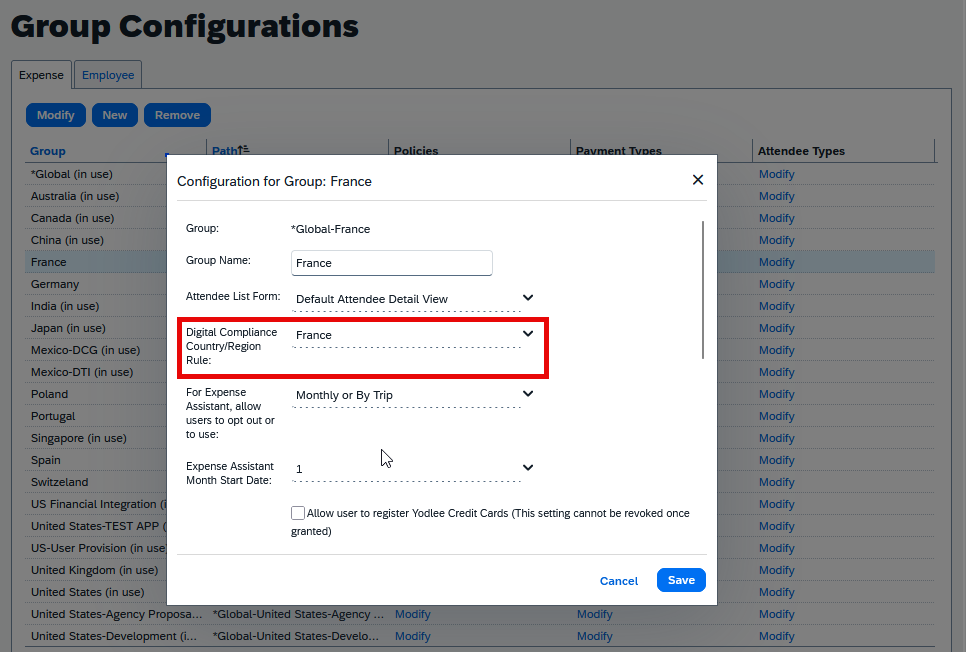
- Navigate to Administration>Expense>Group Configurations.
- Select the Expense Group Configuration applicable to France and click Modify.
- Under the Digital Compliance Country/Region Rule, click on the drop-down and select France.
- Save changes.
Disclaimer
The document is provided for customers and partners to plan the implementation to support e-invoicing regulation for France for Concur Expense.